GROWTH · CONTROL · FREEDOM
See how Realvolve connects your business.
Explore relationships, workflows and transactions with a hands-on sample tour.
Explore relationships → Explore workflows → Explore transactions →
01. Turn relationships into opportunities.
Sample buyer: Jordan Avery · Active Buyer
Relationship timeline
Initial buyer consultation
Record preferences and next steps.
Buyer expectations email
A personalized communication scheduled through a workflow.
Post-closing check-in
Maintain the relationship after closing.
02. See the workflow behind the work.
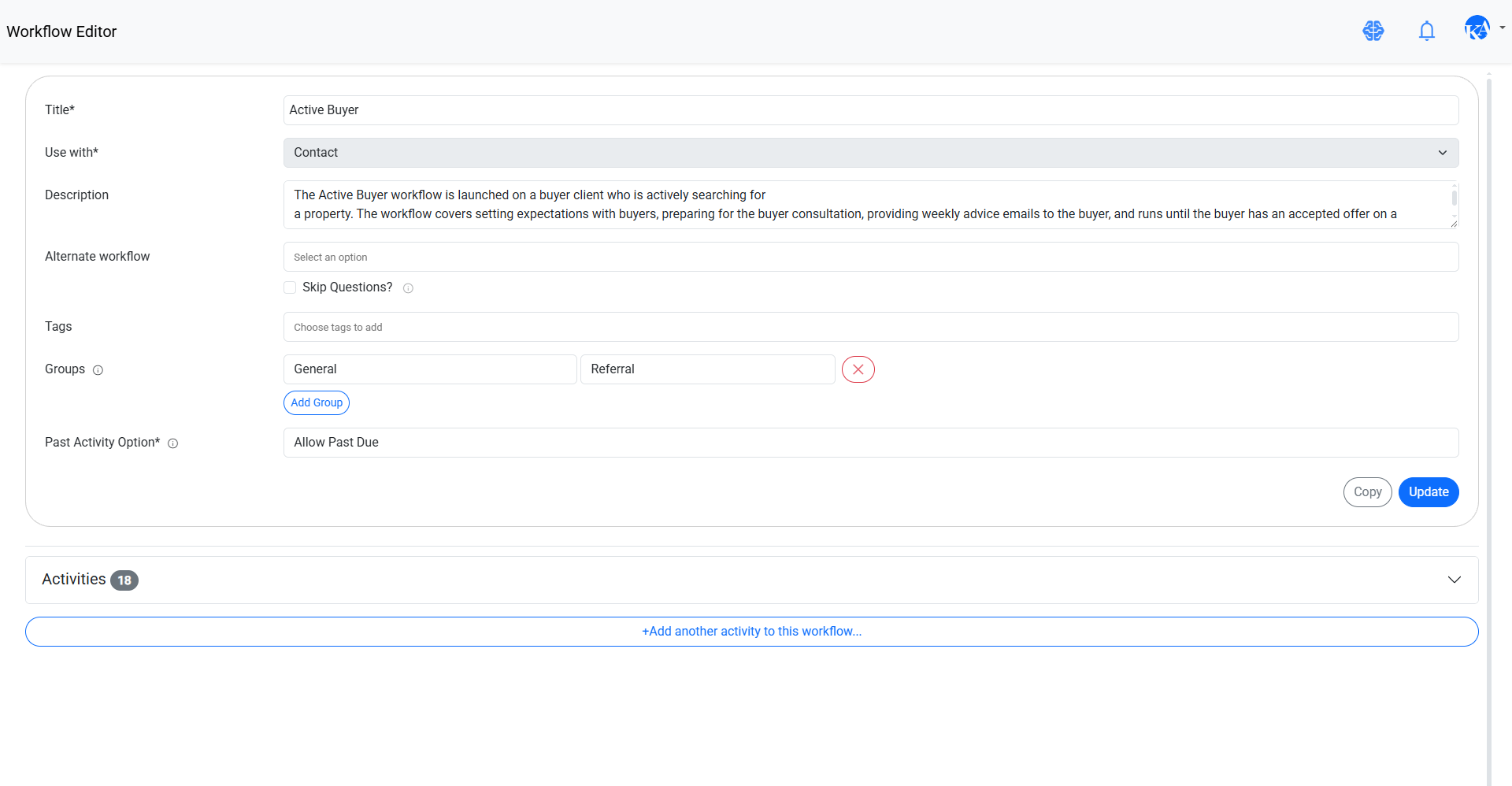
Active Buyer · Contact workflow · 18 activities in the supplied example
Explore the activity schedule
Day 0 · Confirm buyer appointment details
Call · Buyer's Agent · 0 days after Start Date
Day 0 · Send funding email
Email · Buyer's Agent · 0 days after Start Date
Day 1 · Call lender
Call · Buyer's Agent · 1 day after Start Date
Day 7 · Week 1 buyer advice email
Email · Buyer's Agent · 7 days after Start Date
Day 14 · Week 2 buyer advice email
Email · Buyer's Agent · 14 days after Start Date
1 day before appointment · Prepare for buyer appointment
To Do · Buyer's Agent · Relative to Next Appointment Date
03. Coordinate contract to close.
7965 119th Ave · Sample transaction
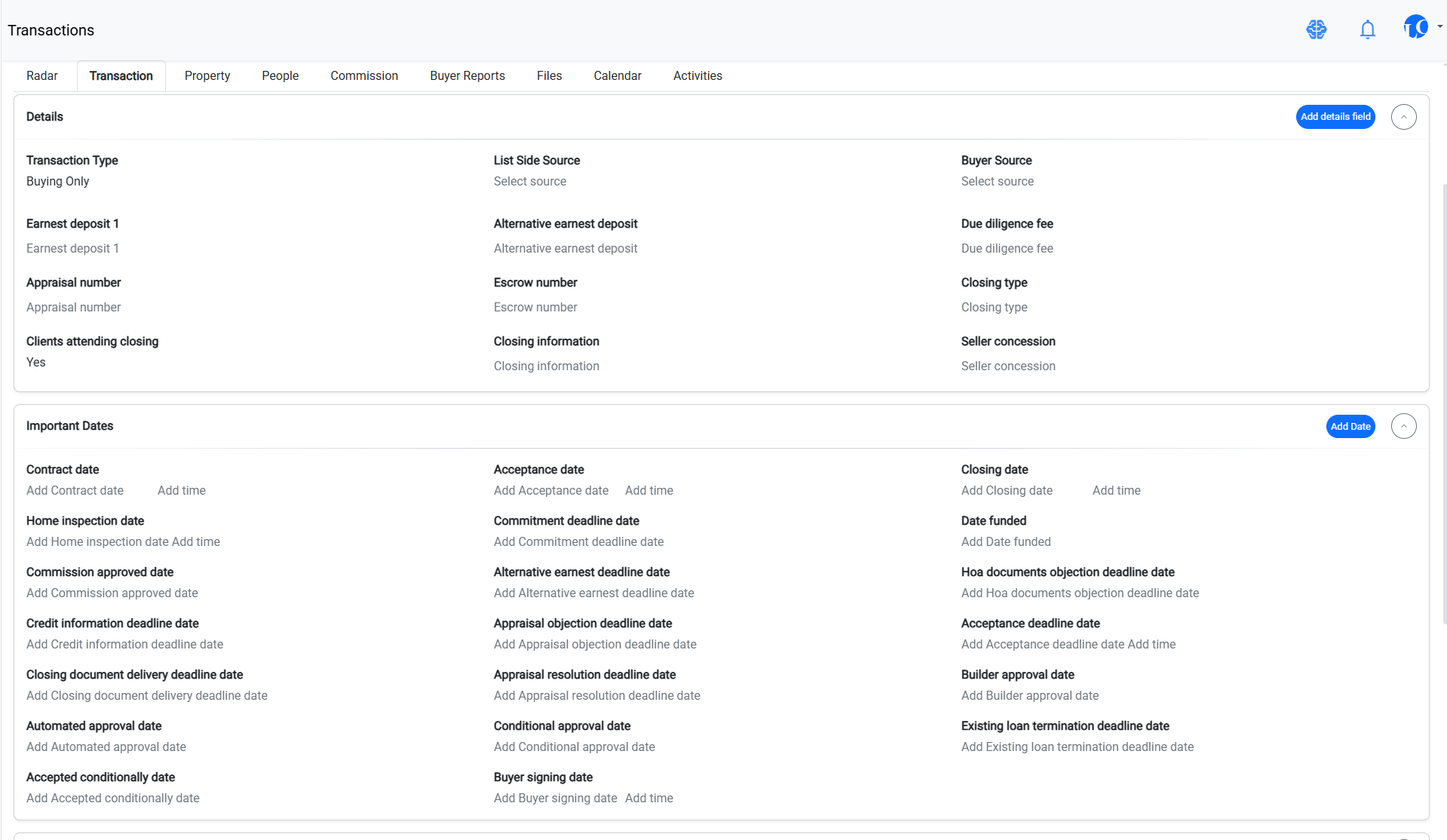
Important dates and party members
Contract: Nov 4, 2026 · Inspection: Nov 12, 2026 · Closing: Jan 7, 2027
Buyer · Buyer's Agent · Loan Officer · Escrow Officer
Contract to Close (Buyer)
Request HOA docs
To Do · Coordinate required transaction documents.
Email settlement closing to buyer
Email · Closing communication.
Confirm receipt of closing statement
Call · Verify important document receipt.
Moving checklist
Email · Help your client prepare for the move.
05 / HANDS-ON SIMULATOR
Change the closing date. See what follows.
Use the sample controls to explore how relative milestones and task ownership work.
Closing milestone
Closing date
Generate an example schedule to see the dates.
Closing preparation · 7 days before closing
Closing-day confirmation · On closing date
Post-closing check-in · 30 days after closing
Assign a task
Responsible role
Confirmation call · Unassigned in this simulation
Conceptual simulation only. Realvolve's configured workflow rules determine actual behavior.
REALVOLVE · INTERACTIVE PRODUCT EXPERIENCE
See how your entire business works together.
Follow one fictional client from first conversation to closing—and discover how Ellis helps you stay a step ahead.
 realvolve
INTERACTIVE DEMO · FICTIONAL DATA
Business DashboardREALVOLVE PRODUCT VIEW
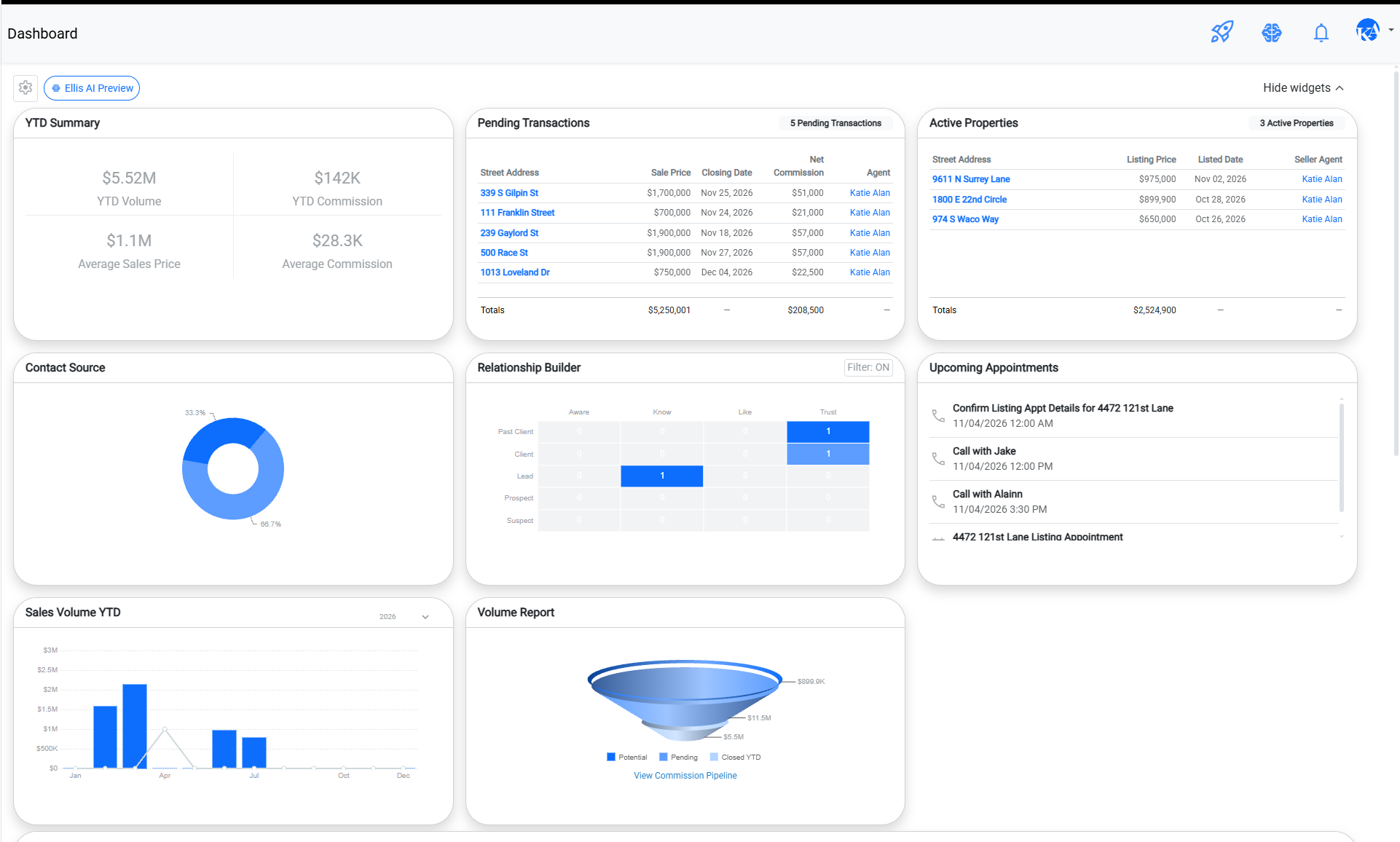
Your daily business signals in one workspace.
01 / BUSINESS INTELLIGENCE
Know where your business stands.
Your actions across relationships, workflows, and transactions come together here.
12
Relationships
3
Transactions
0
Planned activities
Needs attention
Jordan Avery · Buyer follow-up workflow not yet started.
Relationship BuilderREALVOLVE PRODUCT VIEW
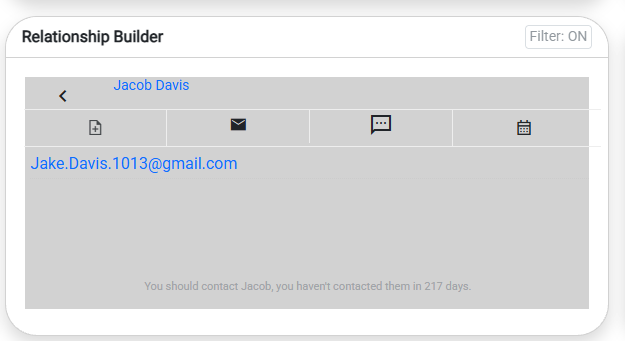
Your contact history, notes, and communication tools in one place.
02 / RELATIONSHIP MANAGEMENT
Jordan Avery Active buyer
Every relationship has a story. Keep the details, history, and next steps connected.
Relationship profile
Looking for a family home
Preferred area: Westlake
Next step: buyer follow-up
Activity timeline
Oct 28 · Discussed search priorities
Oct 22 · Buyer consultation
See the real Realvolve Relationship Builder
Workflow EditorREALVOLVE PRODUCT VIEW
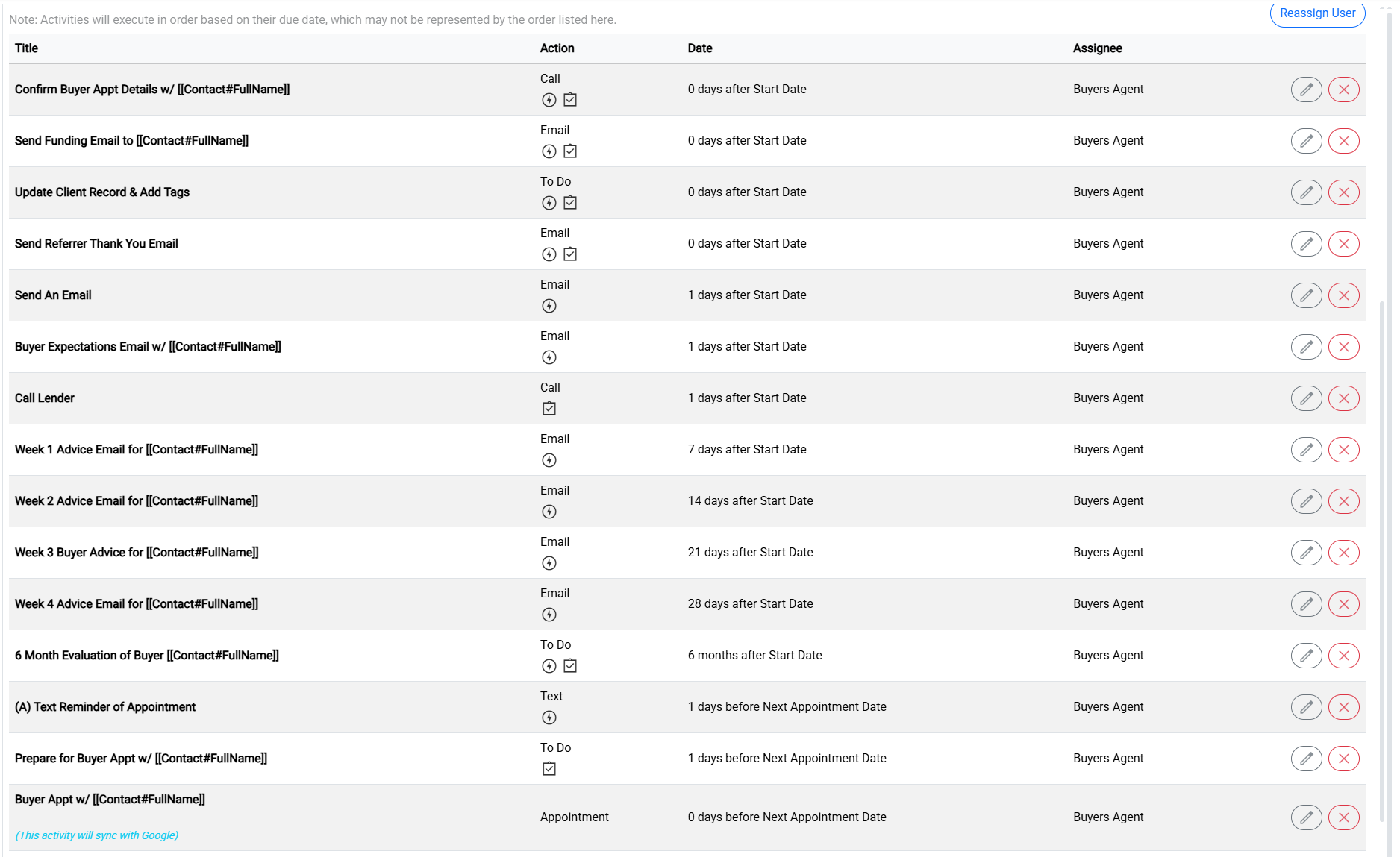
A visual view of the workflows that power your client experience.
03 / WORKFLOW AUTOMATION
Make follow-through repeatable.
Turn a good process into a consistent experience for every client.
Active Buyer Follow-Up
Day 0 · Personal follow-up
Day 1 · Lender check-in
Day 7 · Market update
Day 14 · Relationship touchpoint
See the real Realvolve Workflow Editor
Transaction WorkspaceREALVOLVE PRODUCT VIEW
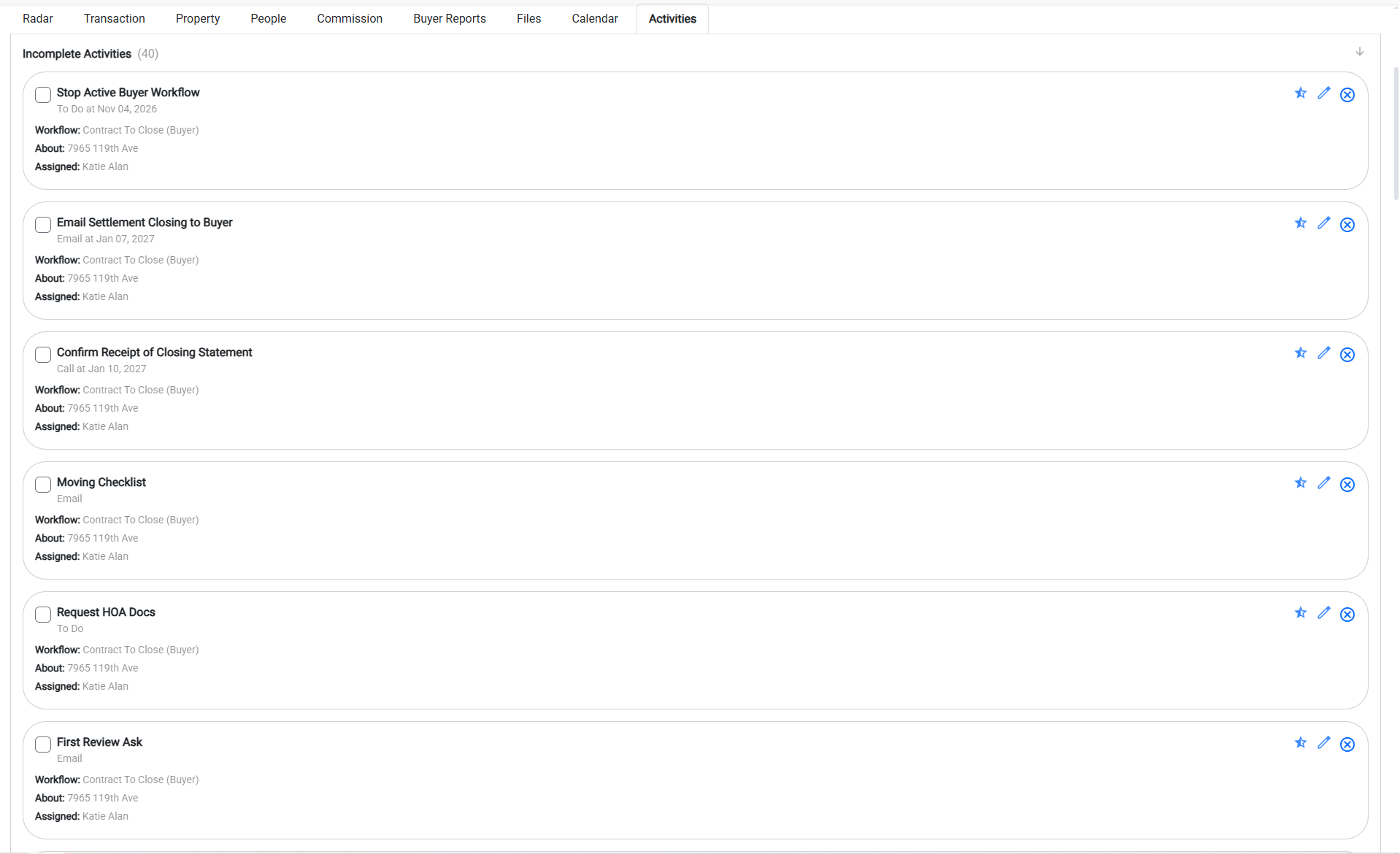
Activities and milestones connected to the transaction.
04 / TRANSACTION MANAGEMENT
One deal. Every moving part.
Jordan's purchase · 124 Oakview Drive · Fictional transaction
Closing: January 7, 2027
Change the closing date to recalculate the linked milestones.
See the real Realvolve Transaction Detail
Ellis IntelligenceREALVOLVE PRODUCT VIEW
A prioritized view of opportunities and next actions.
05 / ELLIS · OPERATIONS PARTNER
Your next move, brought into focus.
Ellis helps surface priorities and practical next steps using your business context.
✦ Ellis briefing
Jordan is an active buyer. Review the relationship and confirm the next touchpoint.
Illustrative scripted briefing. Not a live AI conversation or autonomous action.
Step 1 of 5 · Know where you stand
Start with a clear view of your business, then explore what powers it.
This is a fictional demonstration. No messages are sent and no Realvolve account is modified.
THE INTERACTIVE REALVOLVE EXPERIENCE
See what happens when your entire business works together.
Follow one client from first conversation to closing—and see how Ellis helps you stay a step ahead. Everything below is a hands-on simulation using fictional data.
realvolve##INLINE0##DEMO WORKSPACE · NO REAL CUSTOMER DATA
YOUR WORKSPACE
▦ Overview♙ Contacts↻ Workflows⌂ Transactions✦ EllisA guided illustration of how Realvolve connects the work behind your business.
RELATIONSHIP MANAGEMENT
Jordan Avery Active buyer
Keep the context behind every relationship in one place.
Relationship profile
Looking for a family home
Preferred area: Westlake
Next step: buyer follow-up
Recent activity
Oct 28 · Discussed search priorities
Oct 22 · Buyer consultation
WORKFLOW AUTOMATION
Make great follow-through repeatable.
Choose a proven process and see what gets organized for Jordan.
Active Buyer Follow-Up
Start workflow for JordanDay 0 · Personal follow-up
Day 1 · Lender check-in
Day 7 · Market update
Day 14 · Relationship touchpoint
TRANSACTION MANAGEMENT
One deal. Every moving part.
Jordan's purchase · Fictional transaction
Assign closing check to coordinatorBUSINESS INTELLIGENCE
The bigger picture, without the busywork.
12
Active relationships
3
Active transactions
0
Activities scheduled
What needs attention?
Jordan Avery · Relationship follow-up →Avery purchase · Closing milestones →MEET ELLIS · YOUR OPERATIONS PARTNER
Less hunting for what matters. More time acting on it.
Ellis helps surface priorities and suggests practical next steps using the context of your business.
✦ Ellis briefing
Jordan has an active buyer relationship. Consider reviewing the follow-up plan and confirming the next touchpoint.
Review my prioritiesThis is a scripted illustration of Ellis's intelligence dashboard and suggested actions—not a live AI conversation or a promise of autonomous execution.
Illustrative demo with fictional data. No real messages are sent, and no Realvolve account is modified.
HANDS-ON REALVOLVE EXPERIENCE
Try the workflow, not just the screenshots.
Use this fictional workspace to explore how relationships, workflows, and transactions connect.
realvolve · Interactive demo · fictional data
CONTACT RECORD
Jordan Avery
Buyer · Relationship in progress
Relationship timeline
Oct 28 · Discussed buying criteria
Oct 22 · Buyer consultation completed
WORKFLOW LIBRARY
Active Buyer Workflow
Day 0 · Send consultation follow-up
Day 1 · Confirm lender conversation
Day 7 · Buyer market update
Day 14 · Personal check-in
Start workflow for JordanTRANSACTION RECORD
Avery Purchase
Example property · Fictional transaction
Closing date
January 7, 2027
Move closing earlierMove closing laterAutomatically recalculated milestones
Assign closing confirmation
Assign to Transaction CoordinatorBUSINESS OVERVIEW
Here's what matters today
12 relationships · 3 active transactions
0 workflow activities generated
Reconnect with Jordan →Review Avery closing →Open Jordan's record to begin.Reset demo
Illustrative simulation only. No real customer data, messages, or account changes.
GUIDED PRODUCT EXPERIENCE
Explore the real Realvolve interface.
Choose a screen, then click numbered hotspots to see how it works.
Relationship Builder
Workflow Editor
Transaction Detail
Dashboard Widgets
Real product screenshots with explanatory overlays. The hotspots do not modify Realvolve. Review images for sensitive data before publishing.
REAL PRODUCT INTERFACE
See the actual Realvolve application.
These screenshots show the real interface. The interactive scenarios on this page use fictional data.
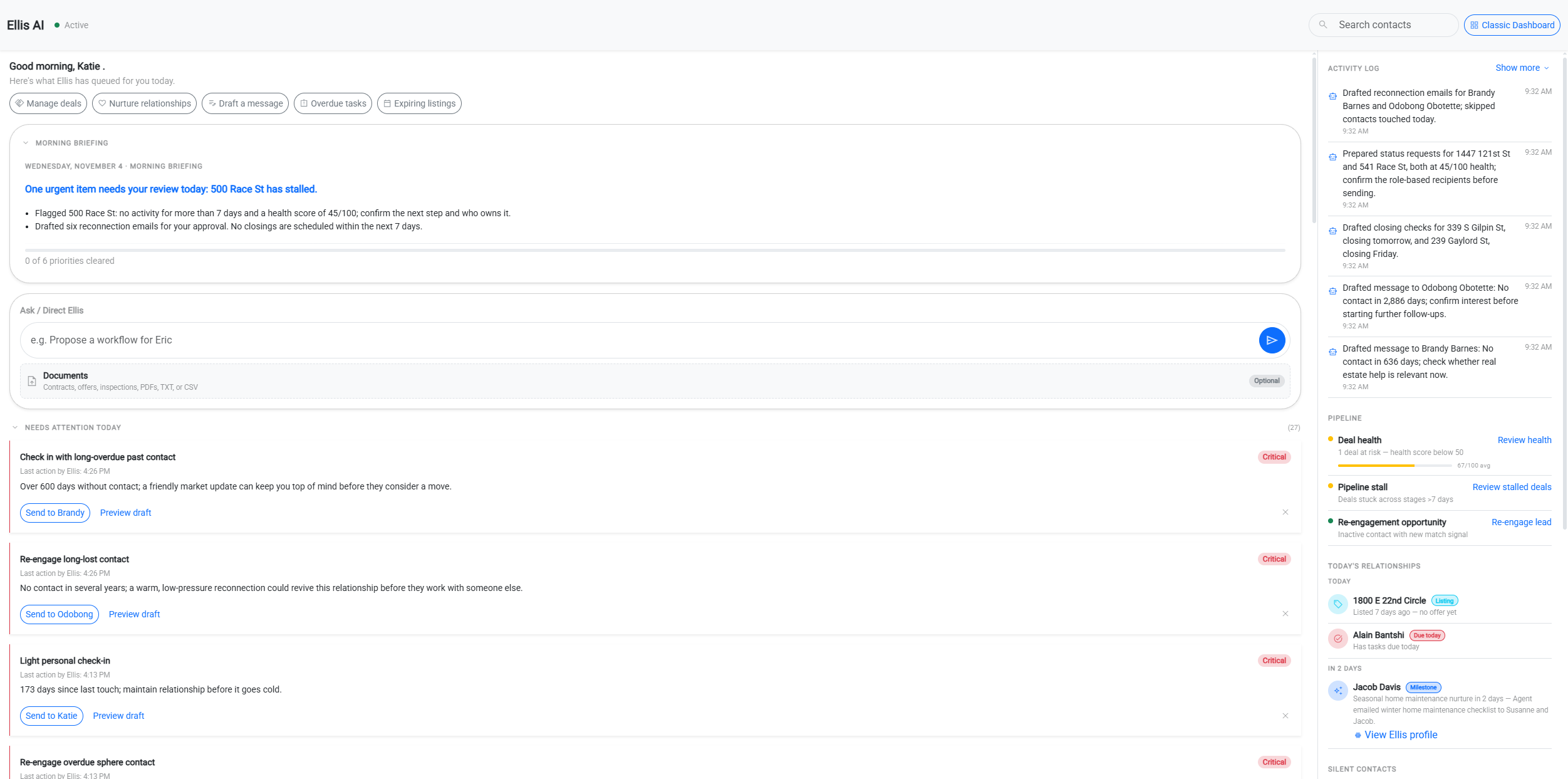
1. Ellis intelligence dashboard
The daily intelligence layer and suggested actions.
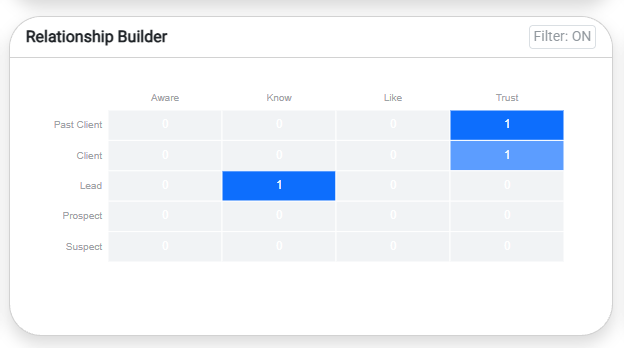
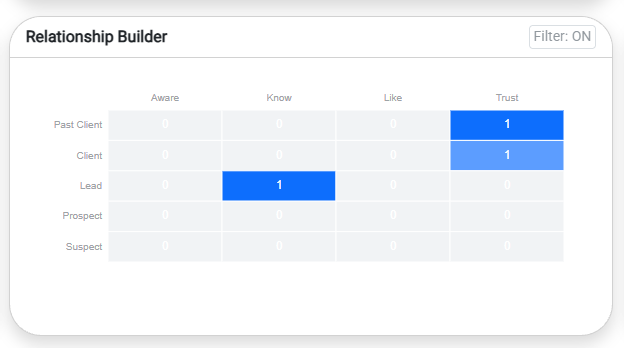
2. Relationship Builder
Relationship segmentation and follow-up timing.
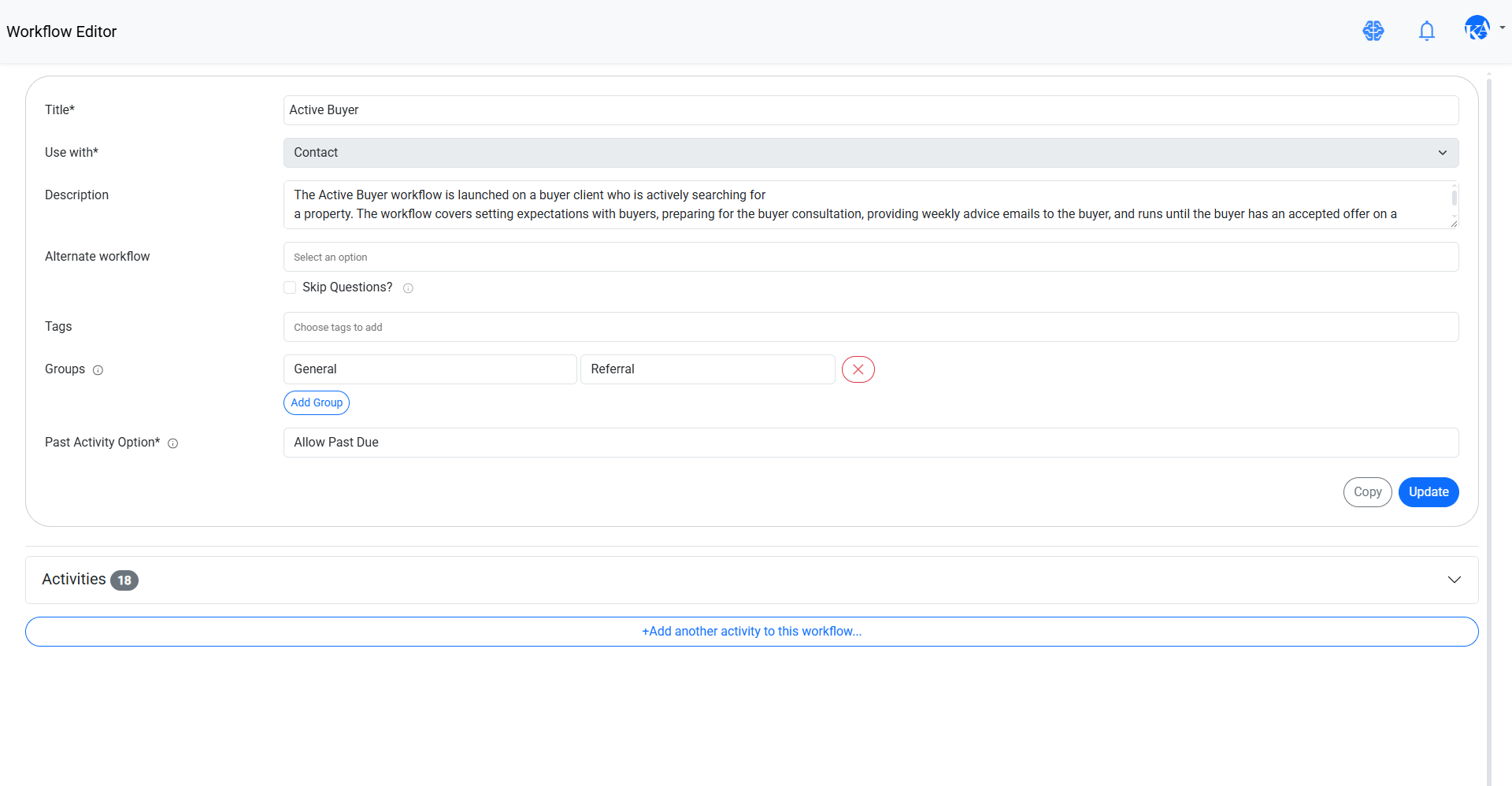
3. Workflow Editor
The real activity and workflow configuration interface.
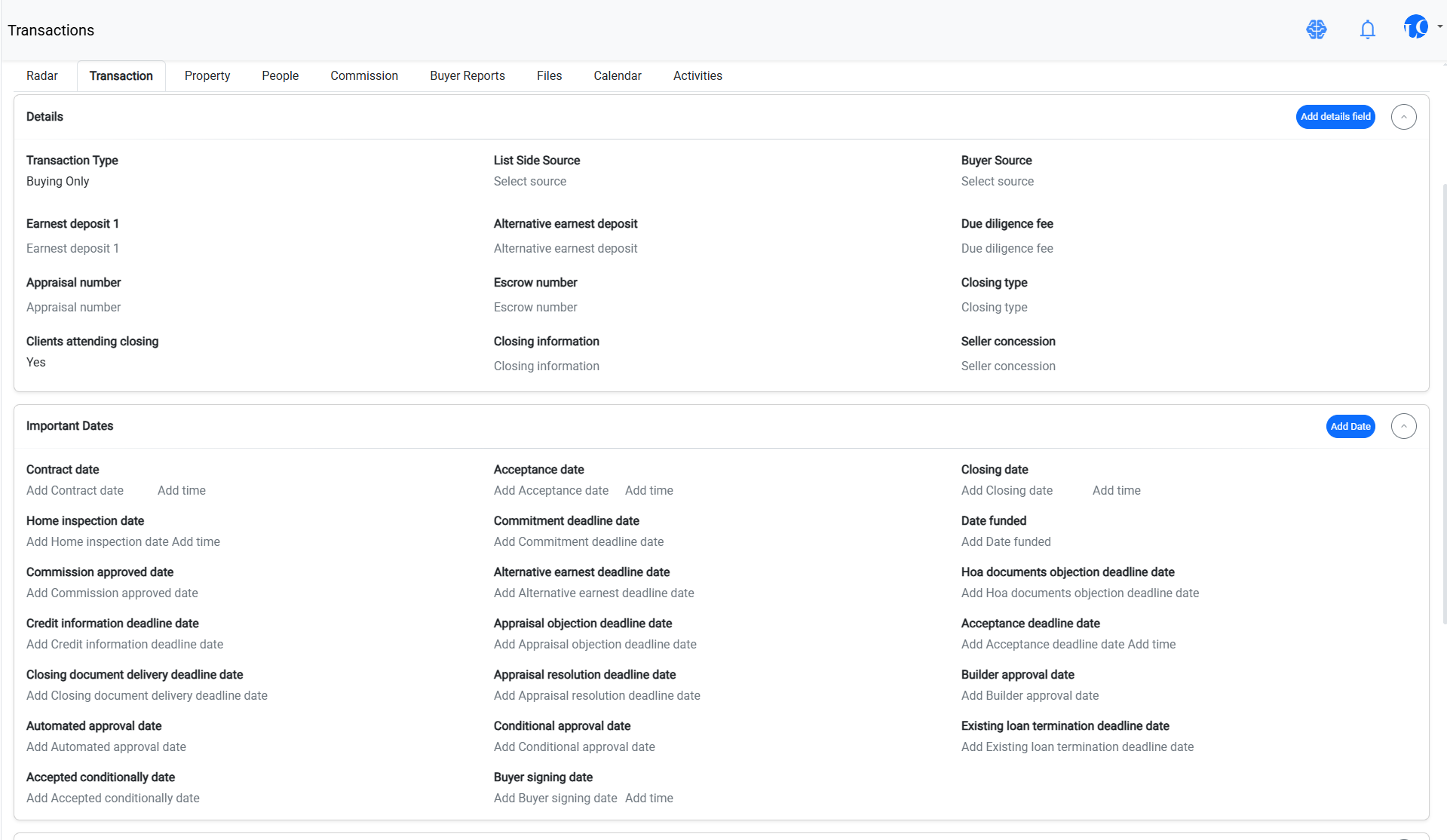
4. Transaction detail
People, dates, and activities in a transaction.
5. Business dashboard
Widgets for business activity and pipeline.
Publication note: Review these screenshots for personal or customer information before making this page public.
04 / INTERACTIVE SCENARIOS
What happens when a closing date changes?
Explore milestone-based scheduling. The examples illustrate how configured workflow rules can operate; they do not change live data.
Choose a scenario
Closing January 7, 2027
7 days before closing: December 31, 2026.
30 days after closing: February 6, 2027.
Closing moves to January 21, 2027
7 days before closing: January 14, 2027.
30 days after closing: February 20, 2027.
Milestone-relative activities can move when configured to follow a revised date.
Assign a task to a team role
A workflow activity can be assigned to a role such as Buyer's Agent, allowing the process to be repeatable across transactions.
The connected system
1. A contact record stores the relationship and history.
2. An Active Buyer workflow structures calls, emails, and to-dos.
3. A transaction connects dates, parties, and contract-to-close activities.
4. After closing, relationship nurturing continues.
06 / MEET YOUR GUIDE
Questions about how Realvolve works?
Explore answers grounded in the workflow and product concepts behind this tour. A conversational AI assistant is planned, but this first guide uses curated answers rather than inventing product behavior.
Ask Realvolve
How is Realvolve different from a basic contact database?
Contacts, properties, transactions, files and activities connect through workflows, templates and merge fields. That lets information support a repeatable client process rather than remaining isolated in a record.
Can a workflow handle both automated communication and personal tasks?
Yes. A workflow can contain activities such as calls, to-dos, emails and texts. Activities can include instructions, scheduling and assignments. Available behavior depends on the specific workflow configuration and account capabilities.
What happens when a transaction date changes?
Workflows can be built around important dates. Relative scheduling can help calculate dependent activity dates. Whether existing activities are automatically recalculated depends on the specific configured rules.
Can a team use the same workflow?
Workflows can assign responsibility and provide consistent instructions, helping different people follow the same established process. Role mapping and assignment details should be verified in the current application.
What does Ellis add?
The current intelligence dashboard can surface priorities and relationship opportunities from the business information in Realvolve. More autonomous assistance is a product direction, not a promise of features currently available.
Does this tour connect to my CRM?
No. This is a public sample experience using fictional data. It does not read or modify customer accounts.